Email-to-System Automation
Ingest incoming customer emails, parse attachments, and automatically create tickets or orders.
Capabilities
Email Workflows We Commonly Automate
Email remains one of the most common operational bottlenecks. Systems can automatically process incoming messages, attachments, requests, and notifications without manual inbox management.
From Inbox Management To Automated Workflows
Before Automation
- • Staff monitors shared inboxes
- • Emails are reviewed manually
- • Attachments are downloaded
- • Data is copied into systems
- • Tickets are created by hand
- • Requests are routed manually
- • Messages can be missed
- • Response times vary
After Automation
- • Emails are captured instantly
- • Content is parsed automatically
- • Attachments are processed
- • Records are created automatically
- • Requests are routed immediately
- • Notifications are triggered
- • Exceptions are flagged
- • Teams respond faster
How Email-to-System Automation Works
Monitor
The system continuously monitors designated inboxes for customer requests, vendor updates, attachments, and operational communications.
Parse
Email content, attachments, sender information, and business-specific data are extracted and structured automatically.
Classify
Business rules determine the request type, priority, destination, ownership, and any required workflow actions.
Create
Tickets, work orders, customer records, requests, tasks, or operational events are automatically created in downstream systems.
Pipeline
Email Processing Pipeline
Visual Tour
What The System Looks Like
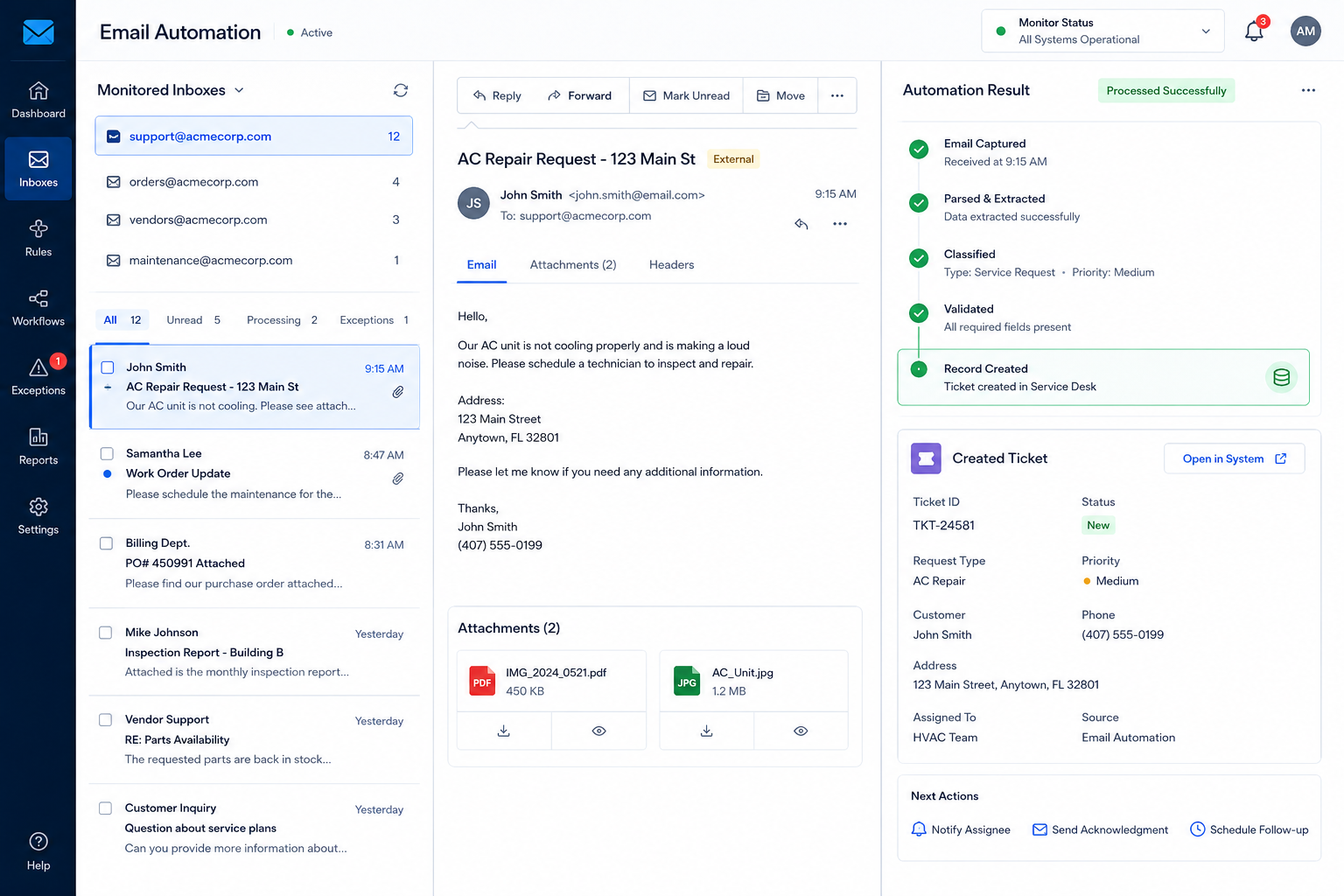
Incoming Email Capture
Customer emails, attachments, and requests are captured automatically from monitored inboxes.
Automated Email Processing
Message content is analyzed, classified, validated, and prepared for operational workflows.
System Record Creation
Tickets, work orders, CRM records, notifications, and assignments are generated automatically.
Solutions
Common Email Automation Systems
Support Ticket Creation
Convert incoming support emails into structured tickets with ownership, priority, and tracking.
Work Order Intake
Automatically create work orders from emailed requests, attachments, and customer communications.
Purchase Order Processing
Capture incoming purchase orders and route them directly into operational workflows.
Maintenance Request Routing
Transform emailed maintenance requests into tracked service records and assignments.
Customer Inquiry Management
Create CRM activities, customer records, and follow-up workflows from inbound messages.
Vendor Communication Processing
Extract operational updates, attachments, and requests from vendor email communications.
Impact
Typical Operational Improvements
Faster Response Times
Incoming requests are processed immediately instead of waiting for staff review.
Reduced Inbox Workload
Eliminate repetitive inbox monitoring and manual routing activities.
Fewer Missed Requests
Ensure customer communications are captured and tracked automatically.
Improved Data Accuracy
Reduce manual copy-and-paste errors when transferring information between systems.
Better Operational Visibility
Track request volume, processing status, and workflow performance from a central dashboard.
Scalable Intake Processes
Handle increasing email volume without adding administrative overhead.
Compatibility
Built To Work With Existing Systems
Email automation typically acts as the front door to operational workflows.
Incoming messages can trigger actions across CRM platforms, ticketing systems, dispatch software, databases, project management tools, and custom applications.
The goal is to eliminate manual inbox processing while maintaining complete visibility into customer and operational activity.
FAQ
Frequently Asked Questions
Q: Can the system monitor multiple inboxes?
Q: Can email attachments be processed automatically?
Q: Can emails create tickets or work orders automatically?
Q: What if emails follow different formats?
Q: Can staff review exceptions before processing?
Still Managing Requests Directly From Your Inbox?
Every customer email, attachment, work order, request, and operational update that requires manual review creates delays and administrative overhead.