Workflow Automation
No more copying data between mismatched tools. Automatically push leads, invoices, and project updates across your systems without human error.
Capabilities
Processes Commonly Automated
Workflow automation can eliminate manual coordination across departments, systems, approvals, and operational processes while maintaining full visibility and control.
From Manual Hand-Offs To Automated Business Processes
Before Workflow Automation
- • Employees move data manually
- • Teams rely on email chains
- • Tasks are assigned inconsistently
- • Approvals create bottlenecks
- • Updates are missed
- • Information exists in silos
- • Errors require correction
- • Processes stall when people are unavailable
After Workflow Automation
- • Data moves automatically
- • Tasks are assigned instantly
- • Approvals follow predefined rules
- • Notifications are triggered automatically
- • Systems stay synchronized
- • Exceptions are flagged immediately
- • Processes run consistently
- • Work continues without manual intervention
How Workflow Automation Works
Trigger
A lead, invoice, form submission, project update, customer action, or operational event initiates the workflow.
Evaluate
Business rules determine routing, assignments, notifications, approvals, and required actions.
Execute
The workflow updates records, creates tasks, sends notifications, synchronizes systems, and advances processes automatically.
Monitor
Activity, exceptions, approvals, and performance metrics are tracked through dashboards and reporting.
Workflow Flow
Automation Execution Pipeline
Visual Tour
What The System Looks Like
Workflow Triggers
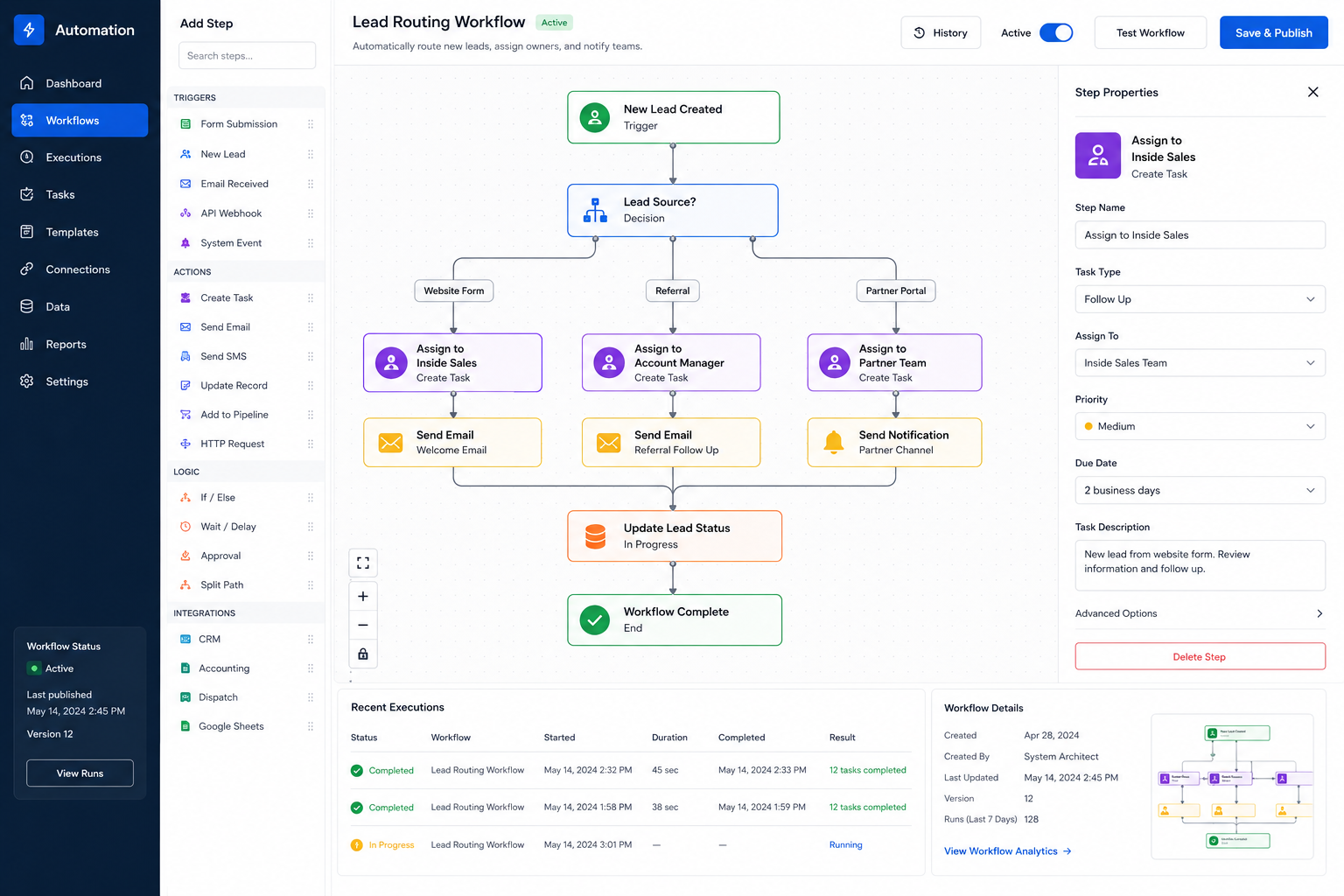
Leads, forms, invoices, service requests, and operational events automatically initiate predefined workflows.
Automation Engine
Business rules evaluate conditions, assign tasks, trigger notifications, and coordinate system activity.
Automated Outcomes
Records are updated, stakeholders are notified, and processes continue automatically across connected systems.
Automation Solutions
Common Workflow Automation Systems
Lead Routing Automation
Automatically assign new leads, trigger follow-up actions, and notify the appropriate sales representatives.
Invoice Approval Workflows
Route invoices through approval chains, notify stakeholders, and synchronize approved records automatically.
Customer Onboarding Automation
Launch intake forms, portal access, document requests, and internal tasks immediately after contract signing.
Project Status Automation
Automatically update stakeholders, customers, and internal teams as project milestones are completed.
Dispatch & Service Workflows
Trigger technician assignments, customer notifications, and operational updates from service events.
Cross-System Process Automation
Move information between CRM, accounting, dispatch, reporting, and operational systems without manual entry.
Impact
Typical Operational Improvements
Less Administrative Work
Reduce repetitive process management and manual coordination across departments.
Faster Process Execution
Workflows move instantly instead of waiting for staff to manually perform each step.
Consistent Operations
Business rules are applied uniformly every time a workflow runs.
Fewer Errors
Eliminate mistakes caused by duplicate entry, missed updates, and manual hand-offs.
Improved Visibility
Track workflow progress, bottlenecks, approvals, and exceptions in real time.
Scalable Growth
Handle increasing operational volume without proportionally increasing staffing requirements.
Compatibility
Designed To Connect Existing Systems
Workflow automation is most effective when it bridges the gaps between the software your business already uses.
Automation can coordinate CRM platforms, accounting systems, dispatch tools, customer portals, reporting systems, and operational databases.
The result is a connected operational environment where information moves automatically and processes execute consistently.
FAQ
Frequently Asked Questions
Q: Can workflow automation connect multiple software platforms?
Q: Can approvals be included in automated workflows?
Q: What types of processes can be automated?
Q: Can workflows handle exceptions?
Q: Will workflow automation replace our existing software?
Related Services
Connected Infrastructure
Still Moving Information Between Systems By Hand?
Every manual hand-off, spreadsheet update, email notification, and duplicate entry creates delays and opportunities for mistakes. Workflow automation keeps information moving automatically.