Business Phone Automation
Route calls dynamically, record conversation metadata, and log every interaction in your CRM.
Capabilities
Business Phone Automation Capabilities
Modern phone systems can do far more than ring a desk phone. Calls can trigger workflows, update records, route dynamically, and integrate directly with operational systems.
From Missed Calls To Automated Call Management
Before Phone Automation
- • Calls ring unanswered
- • Voicemails go unchecked
- • Leads are lost after hours
- • Manual call routing
- • Customer information is searched manually
- • Conversations are undocumented
- • Follow-up depends on staff
- • Reporting is limited
After Phone Automation
- • Calls route automatically
- • Voicemails trigger workflows
- • After-hours coverage is automated
- • Caller information appears instantly
- • Interactions sync to CRM
- • Call activity is tracked
- • Follow-up actions are triggered
- • Management gains visibility
How Business Phone Automation Works
Receive
Inbound calls enter the phone system and are identified using caller information, business rules, schedules, and routing logic.
Route
Calls are directed to the correct department, employee, queue, technician, location, or automated workflow.
Capture
Call metadata, recordings, transcripts, caller details, and outcomes are automatically logged and tracked.
Integrate
Call activity updates CRM records, dispatch systems, dashboards, notifications, and follow-up workflows.
Call Flow
Business Phone Automation Pipeline
Visual Tour
What The System Looks Like
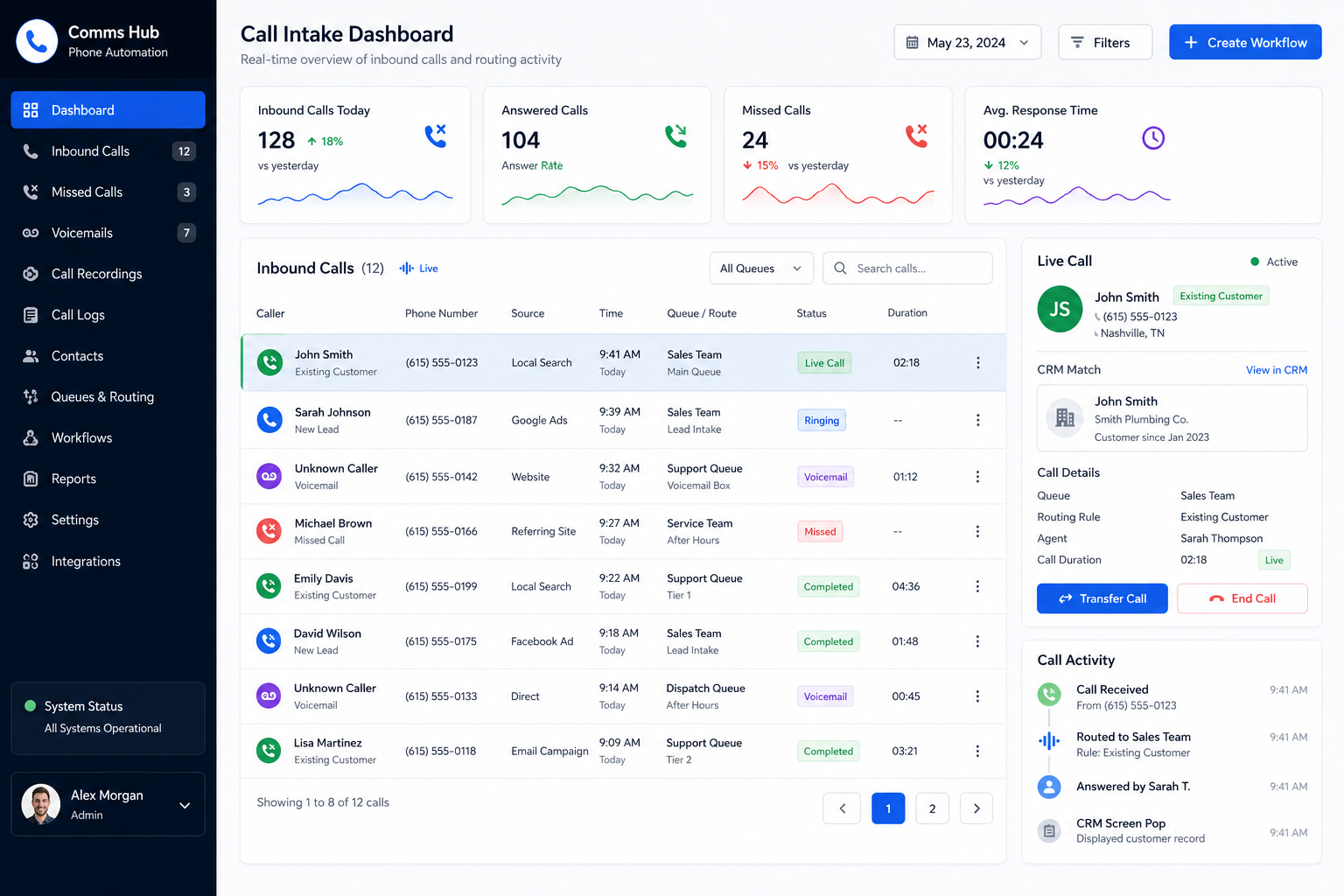
Call Intake Dashboard
View inbound calls, caller details, routing activity, and communication history from a centralized interface.
Routing & Automation Engine
Business rules automatically direct calls, trigger workflows, and update operational systems.
Call Analytics & CRM Activity
Track call outcomes, team performance, customer interactions, and follow-up activity in real time.
Communication Systems
Common Business Phone Automation Systems
Lead Response Automation
Route new prospect calls instantly, create CRM records, and trigger follow-up workflows when staff are unavailable.
After-Hours Call Handling
Capture and route calls outside normal business hours without losing opportunities or service requests.
Dispatch Call Routing
Automatically direct service requests to dispatch teams, on-call technicians, or operational queues.
Customer Service Workflows
Identify callers, surface account information, and streamline support interactions.
Multi-Location Phone Systems
Route calls across offices, departments, and teams using centralized automation rules.
CRM Call Integration
Log calls, recordings, notes, and conversation history directly into customer records.
Impact
Typical Operational Improvements
Fewer Missed Calls
Ensure incoming calls are captured, routed, or escalated appropriately.
Faster Response Times
Connect callers with the right person or workflow immediately.
Improved Lead Capture
Reduce lost opportunities by automating intake and follow-up processes.
Better Visibility
Track call volume, outcomes, response times, and communication trends.
Consistent Customer Experience
Provide reliable call handling regardless of staff availability.
Scalable Communication
Support growing call volume without increasing administrative overhead.
Compatibility
Connected To Your Communication Stack
Business phone automation works best when integrated with the rest of your operational systems.
Calls can automatically create records, trigger notifications, update dispatch workflows, and synchronize customer interactions across platforms.
The result is a phone system that actively supports business operations rather than functioning as a standalone tool.
FAQ
Frequently Asked Questions
Q: Can calls be logged automatically in our CRM?
Q: Can the system handle after-hours calls?
Q: Can calls be routed differently based on caller type?
Q: Can phone automation connect with dispatch operations?
Q: Can we track call performance and reporting?
Still Relying On Staff To Manage Every Call?
Missed calls, manual routing, disconnected systems, and inconsistent follow-up can cost opportunities and reduce customer satisfaction. Phone automation creates a more responsive and scalable communication process.