Document Automation
Instantly extract data from incoming PDFs, work orders, and emails, routing the information exactly where it needs to go without manual typing.
Capabilities
Documents We Commonly Automate
Document automation is not limited to a single file type. Systems can process incoming documents from email, uploads, customer portals, shared folders, forms, and operational software.
From Manual Processing To Automated Operations
Before Automation
- • Staff receives document
- • Document is opened manually
- • Information is reviewed
- • Data is re-entered into software
- • Attachments are uploaded
- • Internal notifications are sent
- • Errors require correction
- • Work is delayed
After Automation
- • Document arrives automatically
- • Data is extracted instantly
- • Business rules validate information
- • Records are created automatically
- • Attachments are linked
- • Notifications are triggered
- • Exceptions are flagged
- • Work continues immediately
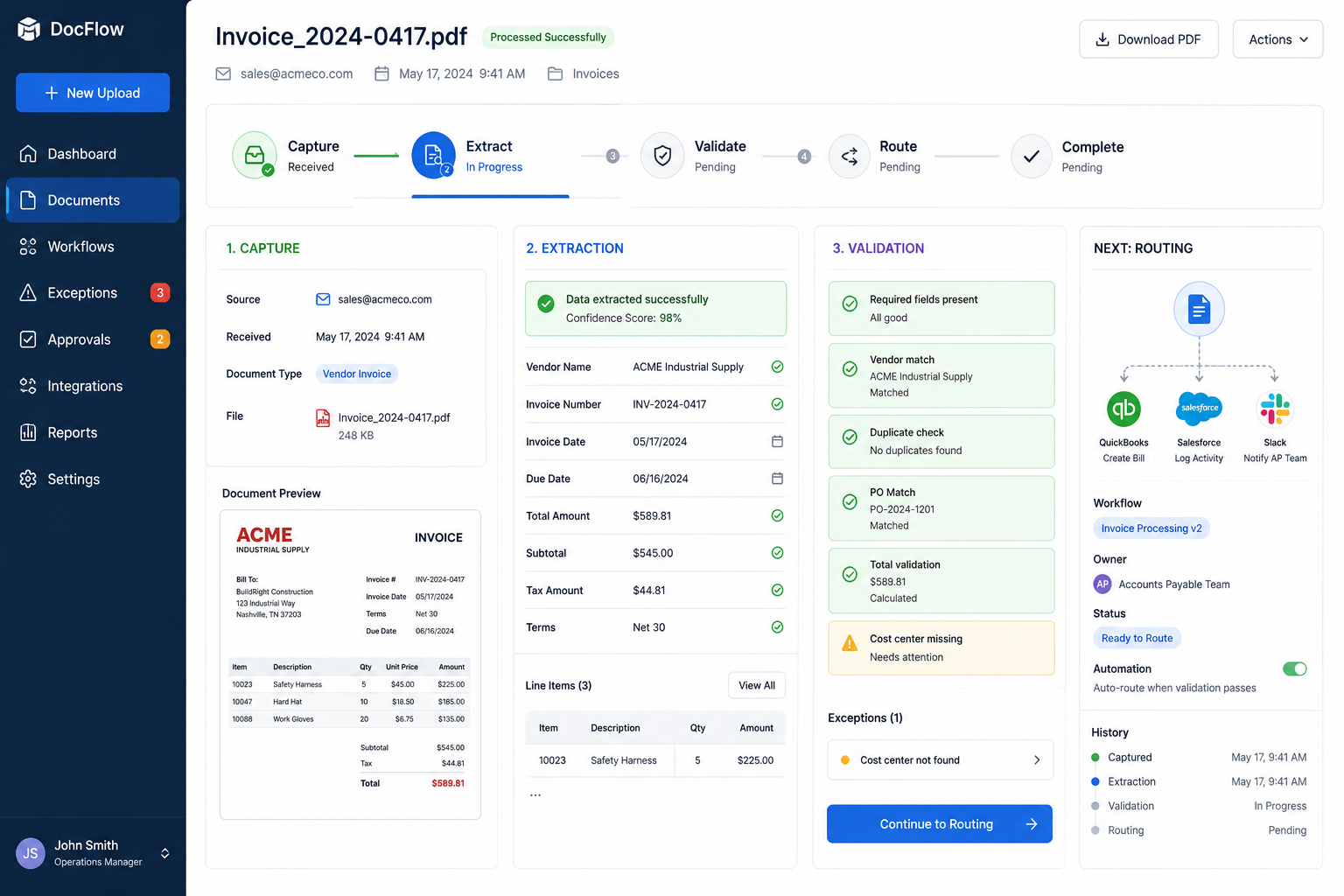
How Document Automation Works
Capture
Documents arrive through email inboxes, uploads, forms, customer portals, shared folders, scanners, or external software platforms.
Extract
The system identifies and extracts names, addresses, dates, totals, line items, customer information, and custom business-specific fields.
Validate
Business rules verify required information, detect duplicates, match existing records, and identify exceptions before processing continues.
Route
Clean data is automatically pushed into CRM systems, accounting software, dispatch systems, databases, dashboards, and operational workflows.
Pipeline
Document Processing Pipeline
Visual Tour
What The System Looks Like
Incoming Documents
Documents arrive from email, uploads, forms, and connected systems.
Automated Processing
Information is extracted, validated, and prepared for downstream workflows.
Operational Output
Clean records, notifications, dashboards, and workflows are updated automatically.
Solutions
Common Document Automation Systems
Invoice Processing
Extract vendor invoices, validate information, match purchase orders, and synchronize approved records with accounting systems.
Work Order Processing
Convert incoming work orders into dispatch-ready records without manual re-entry.
Maintenance Request Automation
Capture maintenance requests, categorize issues, assign vendors, and track status automatically.
Customer Intake Automation
Create customer records, route requests, and trigger onboarding workflows from submitted forms.
Contract Processing
Extract signed agreement details and launch approval, onboarding, or fulfillment workflows automatically.
Email-To-System Automation
Process email attachments, extract relevant information, create records, and notify the correct team members.
Impact
Typical Operational Improvements
Less Manual Data Entry
Reduce repetitive administrative work by automating document handling.
Faster Processing
Documents move through workflows immediately instead of waiting for staff availability.
Fewer Errors
Automated extraction and validation reduce re-keying mistakes.
Better Visibility
Track document status, exceptions, approvals, and operational metrics from a centralized system.
Improved Audit Trails
Maintain a complete history of document activity and processing events.
Scalable Operations
Handle growing document volume without increasing administrative headcount.
Compatibility
Built To Work With Existing Systems
Document automation rarely exists in isolation.
Most implementations connect with existing CRM platforms, accounting software, dispatch systems, customer portals, operational databases, and reporting tools.
Systems are designed to integrate with existing workflows rather than forcing a business to replace software that already works.
FAQ
Frequently Asked Questions
Q: Can the system process scanned PDFs?
Q: Can it connect to our existing software?
Q: What if our documents use different formats?
Q: Can staff review information before processing?
Q: Can email attachments be processed automatically?
Related Services
Connected Infrastructure
Still Spending Hours Entering Information From PDFs?
Every invoice, work order, inspection report, customer form, and emailed document that requires manual entry slows operations and creates opportunities for mistakes.