Invoice Processing Automation
Extract line items from vendor invoices, match them to purchase orders, and sync to accounting.
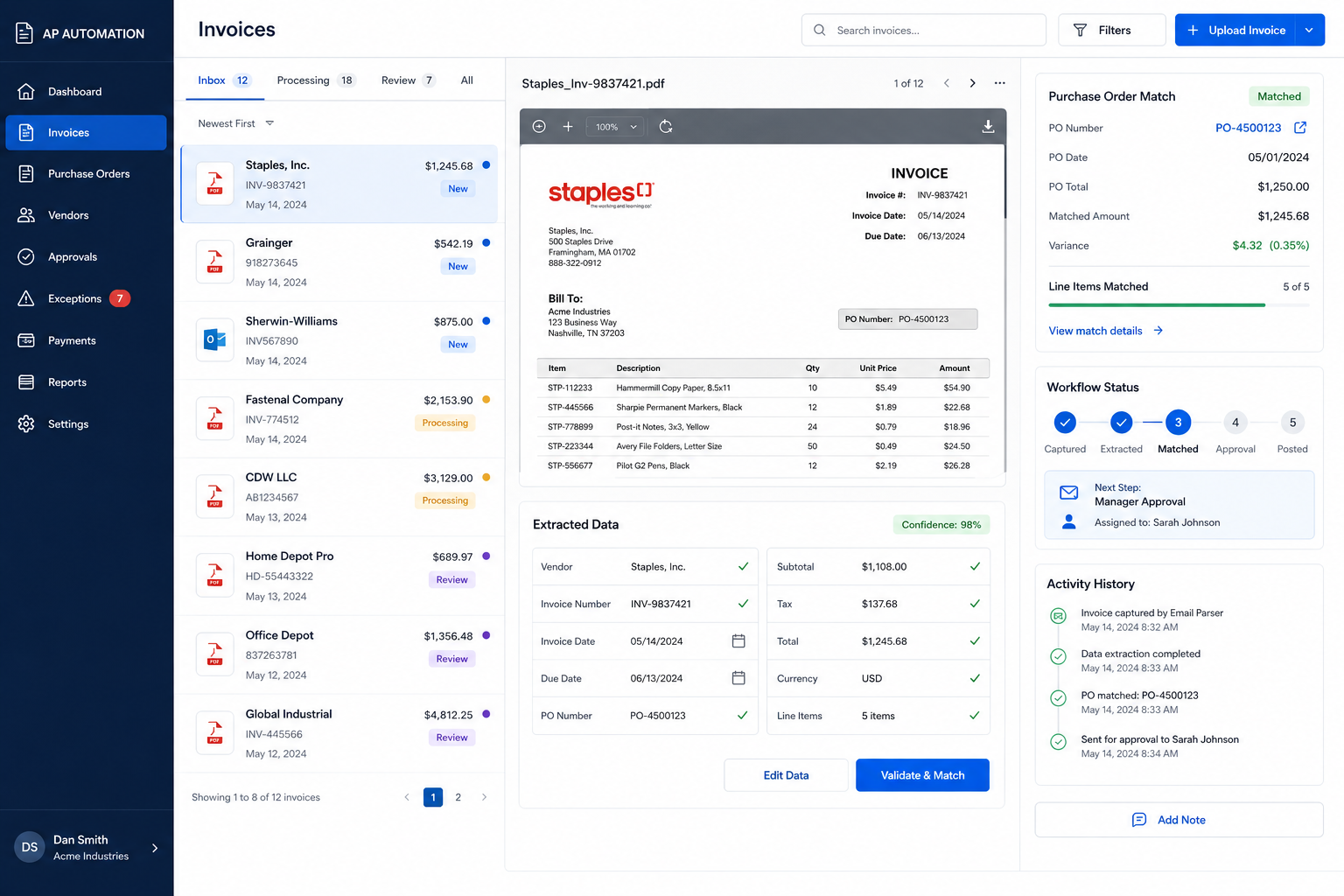
Capabilities
Invoice Processing Tasks We Commonly Automate
Invoice automation goes beyond simple OCR. Systems can capture, validate, match, approve, route, and synchronize invoice information across financial and operational platforms.
From Manual Invoice Entry To Automated Financial Processing
Before Automation
- • Invoices arrive by email
- • Staff opens each invoice manually
- • Vendor details are reviewed
- • Line items are entered by hand
- • Purchase orders are checked manually
- • Approvals are requested through email
- • Accounting records are updated manually
- • Processing queues grow
After Automation
- • Invoices are captured automatically
- • Vendor and invoice data is extracted
- • Line items are mapped instantly
- • Purchase orders are matched automatically
- • Exceptions are flagged for review
- • Approvals are routed automatically
- • Accounting systems are updated
- • Invoices move through workflows faster
How Invoice Processing Automation Works
Capture
Invoices arrive through email inboxes, vendor portals, uploads, shared folders, scanners, or integrated business systems.
Extract
Invoice numbers, vendor information, dates, totals, taxes, line items, and purchase order references are automatically identified.
Match
The system compares invoice data against purchase orders, vendor records, budgets, and approval requirements.
Sync
Approved invoices are pushed into accounting systems, reporting tools, payment workflows, and operational dashboards.
Pipeline
Invoice Processing Workflow
Visual Tour
What The System Looks Like
Invoice Intake
Vendor invoices are automatically captured from email inboxes, uploads, and integrated systems.
Invoice Validation & Matching
Invoice details, line items, and purchase orders are reviewed automatically before approval.
Accounting Synchronization
Approved invoices are routed into accounting workflows, dashboards, and reporting systems.
Financial Automation
Common Invoice Processing Systems
Accounts Payable Automation
Reduce manual invoice entry and accelerate AP workflows through automated extraction, matching, and routing.
Purchase Order Matching
Automatically compare invoices against purchase orders and flag discrepancies before approval.
Vendor Invoice Processing
Capture invoices from multiple vendors and standardize processing regardless of invoice format.
Approval Workflow Automation
Route invoices to the correct managers and departments based on amount, vendor, or business rules.
Accounting System Synchronization
Create accounting-ready records and eliminate duplicate data entry between systems.
Exception Management
Identify missing purchase orders, pricing discrepancies, duplicate invoices, and approval issues automatically.
Impact
Typical Operational Improvements
Reduced Data Entry
Eliminate repetitive invoice entry and reduce administrative workload.
Faster Invoice Processing
Move invoices through review and approval workflows significantly faster.
Improved Accuracy
Reduce errors caused by manual keying and invoice handling.
Better Financial Visibility
Track invoice status, approvals, exceptions, and liabilities in real time.
Stronger Controls
Enforce approval requirements, vendor validation, and purchasing policies automatically.
Scalable AP Operations
Process increasing invoice volume without expanding administrative staff.
Compatibility
Built To Work With Existing Financial Systems
Invoice processing automation is most effective when connected directly to your accounting and operational infrastructure.
Systems can synchronize invoices, approvals, purchase orders, vendors, and payment records automatically.
The result is faster processing, stronger controls, and fewer manual touchpoints across the entire accounts payable workflow.
FAQ
Frequently Asked Questions
Q: Can the system process invoices from different vendors?
Q: Can invoices be matched against purchase orders?
Q: Can the system connect to our accounting software?
Q: What happens if invoice information is missing?
Q: Can approval workflows be included?
Still Manually Entering Vendor Invoices?
Every invoice that requires manual review, data entry, matching, and approval adds administrative overhead and increases the risk of errors. Automation dramatically reduces processing time while improving visibility.