Work Order Management Systems
Track maintenance orders, log materials used, and transition tickets to invoicing seamlessly.
Capabilities
What Work Order Systems Can Manage
Work order management systems centralize maintenance operations, technician activity, asset history, service documentation, materials, approvals, and billing workflows.
From Disconnected Work Orders To Complete Operational Visibility
Before Work Order Management
- • Work orders are tracked on paper
- • Technician updates are inconsistent
- • Materials are logged manually
- • Job status requires phone calls
- • Photos and notes are scattered
- • Completed work is difficult to verify
- • Invoices are delayed
- • Management lacks visibility
After Work Order Management
- • Work orders are centralized
- • Technicians update jobs in real time
- • Materials are tracked automatically
- • Status is visible instantly
- • Photos and notes stay attached
- • Completion data is captured consistently
- • Invoices are triggered automatically
- • Management has full visibility
How Work Order Management Systems Works
Create
Work orders are generated from service requests, maintenance schedules, dispatch systems, customer portals, or internal operations.
Assign
Jobs are assigned to technicians, crews, vendors, or departments based on workload, location, skills, and scheduling requirements.
Execute
Field teams update status, record materials used, upload photos, capture signatures, and document completed work.
Close & Invoice
Completed work orders trigger approvals, reporting updates, invoicing workflows, and historical record retention.
Workflow
Work Order Lifecycle
Visual Tour
What The System Looks Like
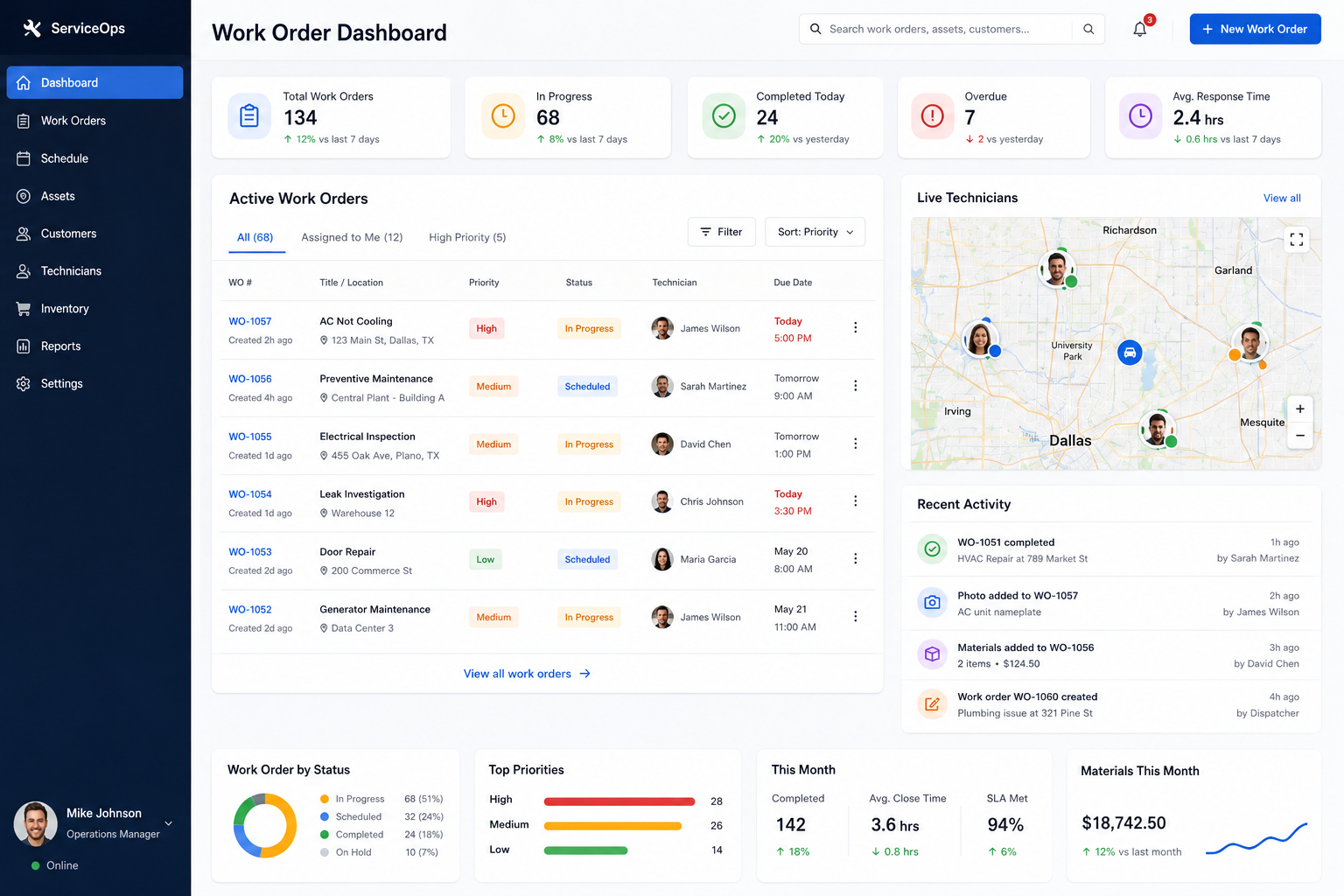
Work Order Dashboard
View active jobs, assignments, priorities, service history, and operational status from a centralized workspace.
Field Service Execution
Technicians update work orders, log materials, upload photos, and capture completion details in real time.
Completion & Billing
Completed work orders feed reporting, approvals, service history, and invoicing workflows automatically.
Operational Solutions
Common Work Order Management Systems
Maintenance Management
Track preventive maintenance, recurring inspections, repairs, and asset service history from a centralized platform.
Field Service Operations
Manage technician assignments, job updates, materials, photos, and customer signatures in real time.
Property Maintenance
Handle tenant requests, vendor assignments, repair tracking, and maintenance reporting across multiple locations.
Equipment Service Tracking
Maintain detailed records of inspections, repairs, maintenance history, and equipment performance.
Facilities Management
Coordinate internal maintenance teams, work requests, service schedules, and operational compliance requirements.
Repair-To-Invoice Workflows
Automatically transition completed work into billing, approvals, accounting, and customer reporting processes.
Impact
Typical Operational Improvements
Faster Job Completion
Reduce delays by giving technicians immediate access to job information and required documentation.
Better Technician Accountability
Track assignments, status updates, completion records, and field activity in one system.
Improved Billing Accuracy
Capture labor, materials, and job details directly from the work order process.
Real-Time Visibility
Monitor active work orders, technician workloads, service history, and operational performance.
Complete Service Records
Maintain a centralized history of repairs, inspections, maintenance activities, and supporting documentation.
Reduced Administrative Work
Eliminate duplicate data entry, manual tracking, and disconnected spreadsheets.
Compatibility
Built To Work With Existing Operations
Work order management systems are most effective when connected to the rest of your operational infrastructure.
Work orders, technician activity, materials, invoices, assets, and customer records can flow automatically between systems.
This creates a single source of truth for field operations while eliminating duplicate data entry and manual coordination.
FAQ
Frequently Asked Questions
Q: Can technicians update work orders from the field?
Q: Can work orders connect to invoicing?
Q: Can recurring maintenance schedules be managed?
Q: Can materials and labor be tracked?
Q: Can the system integrate with dispatch and reporting tools?
Related Services
Connected Infrastructure
Still Managing Work Orders Through Calls, Texts, And Spreadsheets?
Work orders should move seamlessly from request to completion to invoicing. Centralized systems provide visibility, accountability, and operational efficiency across the entire process.