Digital Forms & Data Collection
Replace paper forms, spreadsheets, and manual data collection with custom digital workflows.
Capabilities
Common Digital Form Workflows
Digital forms can be customized for virtually any operational process, from inspections and audits to customer intake, compliance tracking, and field reporting.
From Paper Forms To Real-Time Operational Data
Before Digital Forms
- • Paper forms are completed manually
- • Information is difficult to read
- • Staff re-enter data into software
- • Photos are stored separately
- • Missing information causes delays
- • Reports arrive hours or days later
- • Spreadsheets require manual updates
- • Management lacks visibility
After Digital Forms
- • Forms are completed digitally
- • Required fields ensure accuracy
- • Photos and files are attached automatically
- • Data syncs instantly
- • Validation prevents incomplete submissions
- • Reports are available immediately
- • Workflows trigger automatically
- • Management gains real-time visibility
How Digital Forms & Data Collection Works
Collect
Employees, technicians, customers, or vendors submit information through custom forms on mobile devices, tablets, or desktops.
Validate
Required fields, conditional logic, business rules, and input validation ensure complete and accurate submissions.
Submit
Data, photos, signatures, attachments, and location information are captured and transmitted instantly.
Automate
Submitted information updates operational systems, creates records, triggers workflows, and generates reporting automatically.
Workflow
Digital Data Collection Pipeline
Visual Tour
What The System Looks Like
Mobile Form Collection
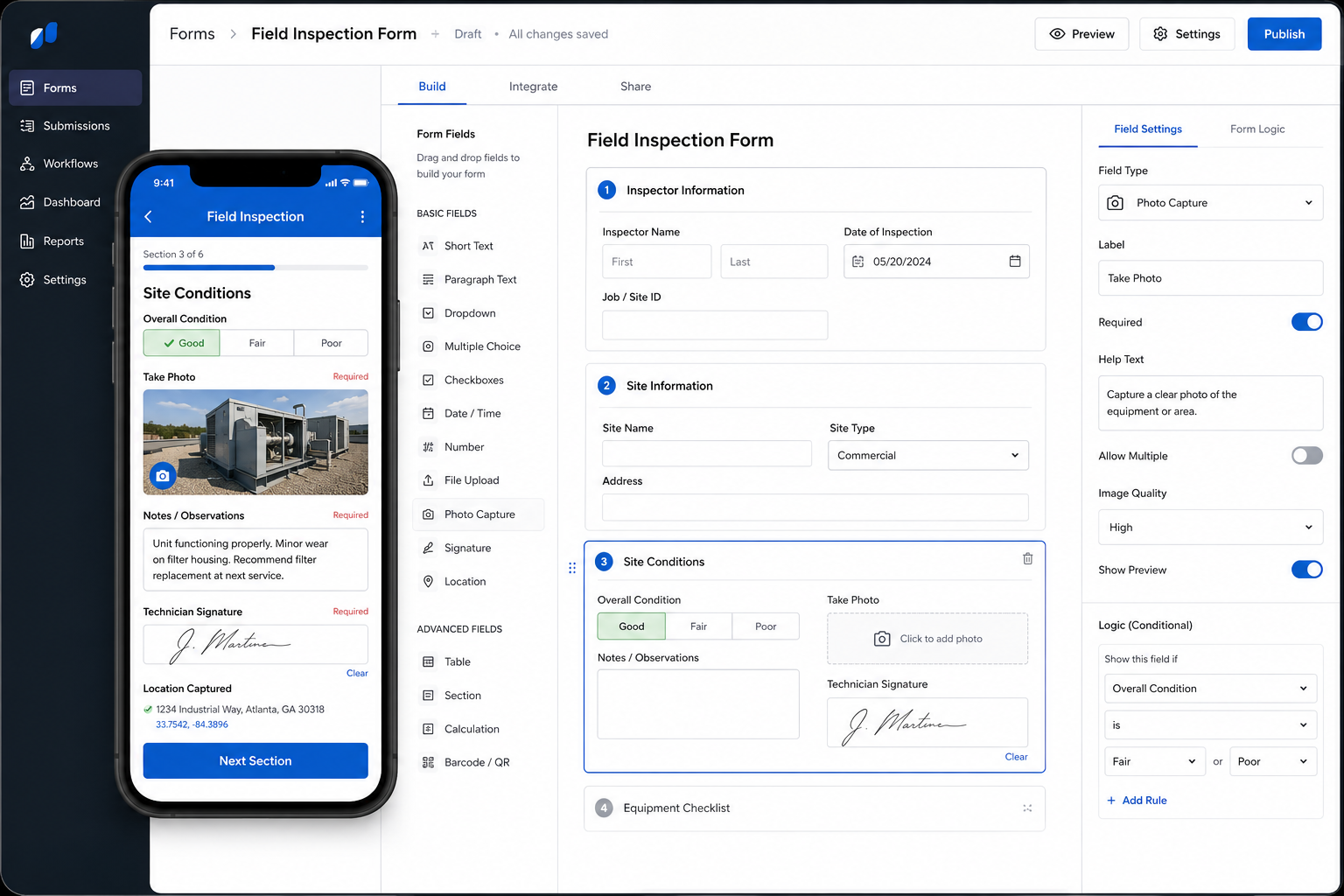
Employees and field teams capture information, photos, signatures, and observations directly from digital forms.
Validation & Workflow Logic
Submissions are validated, organized, and routed through automated business processes.
Operational Reporting
Collected information updates dashboards, records, workflows, and operational systems in real time.
Solutions
Common Digital Form Systems
Field Inspection Forms
Replace paper inspections with mobile forms that capture photos, notes, signatures, and compliance data.
Customer Intake Workflows
Collect customer information digitally and automatically create records, requests, and onboarding workflows.
Safety & Compliance Checklists
Standardize audits, safety inspections, and regulatory documentation with required fields and validation.
Job Completion Reporting
Capture completed work, customer signatures, materials used, and field notes directly from mobile devices.
Equipment & Asset Inspections
Track equipment condition, maintenance requirements, and operational status through structured inspections.
Operational Data Collection
Gather field information, measurements, observations, and operational metrics in a consistent digital format.
Impact
Typical Operational Improvements
Eliminate Paper Processes
Replace physical paperwork and spreadsheets with centralized digital workflows.
Improve Data Quality
Validation rules and required fields reduce incomplete or inaccurate submissions.
Faster Reporting
Information becomes available immediately instead of waiting for paperwork to be returned.
Better Accountability
Track who submitted information, when it was submitted, and what actions were taken.
Real-Time Visibility
Management gains immediate access to operational information from the field.
Automated Workflows
Form submissions can trigger notifications, approvals, dispatches, and downstream business processes.
Compatibility
Integrated With Existing Operations
Digital forms are most valuable when connected directly to the systems already running your business.
Submissions can automatically update CRM platforms, dispatch systems, reporting tools, operational databases, project management software, and customer records.
This eliminates duplicate entry while improving data quality and visibility.
FAQ
Frequently Asked Questions
Q: Can forms be completed on mobile devices?
Q: Can photos and attachments be included?
Q: Can forms require certain fields before submission?
Q: Can forms trigger automated workflows?
Q: Can digital forms replace our paper processes completely?
Still Collecting Information On Paper Or Spreadsheets?
Every manual form introduces delays, missing information, duplicate entry, and reporting blind spots. Digital forms create a faster, cleaner, and more scalable process.