Customer Portals
Give customers real-time access to project status, invoices, documents, approvals, and communication through a branded self-service portal.
Capabilities
What Customers Can Access
Customer portals can be tailored to the exact information, workflows, and interactions your clients need. Everything is centralized in a secure self-service environment.
From Constant Customer Follow-Up To Self-Service Visibility
Before Customer Portals
- • Customers call for status updates
- • Staff searches for documents
- • Invoices are emailed repeatedly
- • Approvals are handled manually
- • Communication is scattered
- • Project information is difficult to find
- • Staff answers repetitive questions
- • Customer experience suffers
After Customer Portals
- • Customers access information directly
- • Documents are available 24/7
- • Invoices and balances are visible
- • Approvals happen online
- • Messages are centralized
- • Project updates are automated
- • Support requests are organized
- • Customers stay informed
How Customer Portals Works
Connect
The portal connects to your CRM, project management, accounting, dispatch, and operational systems to centralize customer information.
Publish
Relevant documents, project updates, invoices, approvals, and communication records are securely made available to each customer.
Engage
Customers log in to review progress, approve requests, access documents, submit questions, and monitor activity.
Synchronize
Portal activity automatically updates internal systems, keeping staff and customers aligned in real time.
Portal Flow
Customer Portal Information Pipeline
Visual Tour
What The System Looks Like
Customer Dashboard
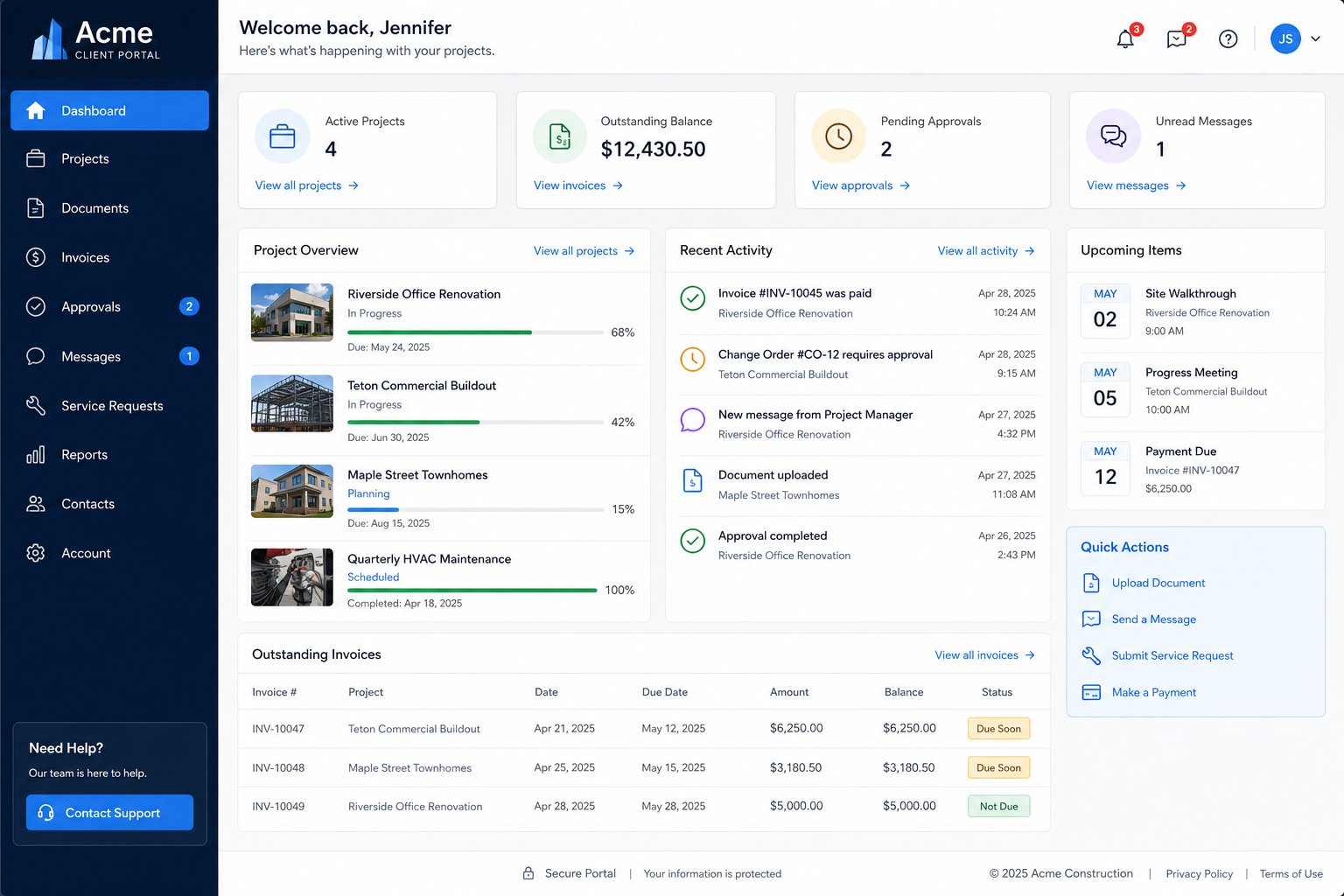
Customers log in to view projects, invoices, documents, approvals, and account activity from a single dashboard.
Project & Document Access
Project information, files, updates, and communication are organized in a secure self-service workspace.
Real-Time Visibility
Customers stay informed with live status updates, approvals, messages, and operational activity.
Portal Solutions
Common Customer Portal Systems
Project Management Portals
Give customers visibility into project milestones, schedules, approvals, documents, and upcoming tasks.
Construction Client Portals
Provide access to plans, change orders, progress updates, invoices, and project communication.
Property Management Portals
Allow tenants or property owners to view requests, documents, updates, invoices, and maintenance activity.
Service Customer Portals
Let customers review work orders, service history, invoices, warranties, and appointment information.
Document Access Portals
Create a secure location for contracts, reports, photos, certifications, and operational records.
Approval & Communication Hubs
Centralize approvals, messages, requests, and project communication in one customer-facing system.
Impact
Typical Operational Improvements
Fewer Customer Calls
Customers can access information directly instead of contacting office staff for routine updates.
Improved Customer Experience
Provide transparency, faster access to information, and a more professional service experience.
Centralized Communication
Keep project discussions, requests, approvals, and documents organized in one location.
Faster Approvals
Reduce delays by allowing customers to review and approve requests online.
Greater Visibility
Give customers real-time access to the information they care about most.
Reduced Administrative Work
Minimize repetitive document retrieval, invoice requests, and status update calls.
Compatibility
Connected To Your Existing Operations
Customer portals are most effective when connected to the systems already running your business.
Project updates, invoices, documents, requests, approvals, and communication can be synchronized automatically from your existing software.
The result is a single customer-facing experience without requiring duplicate data entry or manual updates.
FAQ
Frequently Asked Questions
Q: Can the portal match our branding?
Q: Can customers access invoices and documents?
Q: Can the portal connect to our existing software?
Q: Can customers submit requests or messages?
Q: Can different customers see different information?
Still Answering The Same Customer Questions Every Day?
Customers want immediate access to project updates, invoices, documents, approvals, and communication. A customer portal gives them self-service access while reducing administrative workload.