Customer Onboarding Automation
Deliver intake forms, trigger signature requests, and provision client portals automatically upon contract signing.
Capabilities
Common Onboarding Automation Components
Customer onboarding automation can coordinate every step between contract signing and service delivery, ensuring customers move through a consistent and efficient process.
From Manual Client Setup To Automated Onboarding
Before Automation
- • Contract is manually reviewed
- • Staff sends intake forms
- • Portal accounts are created manually
- • Tasks are assigned individually
- • Welcome emails are sent manually
- • Customer information is re-entered
- • Steps are missed occasionally
- • Onboarding progress is unclear
After Automation
- • Signed contracts trigger workflows
- • Forms are delivered automatically
- • Accounts are provisioned instantly
- • Internal tasks are assigned
- • Welcome communications are sent
- • Customer data is synchronized
- • Progress is tracked automatically
- • Onboarding starts immediately
How Customer Onboarding Automation Works
Trigger
A signed agreement, approved proposal, completed payment, or CRM event automatically initiates the onboarding workflow.
Collect
The system delivers intake forms, questionnaires, document requests, and onboarding requirements to the customer.
Provision
Customer accounts, portals, project records, folders, and internal resources are created automatically.
Launch
Teams receive assignments, customers receive onboarding instructions, and implementation activities begin immediately.
Pipeline
Customer Onboarding Workflow
Visual Tour
What The System Looks Like
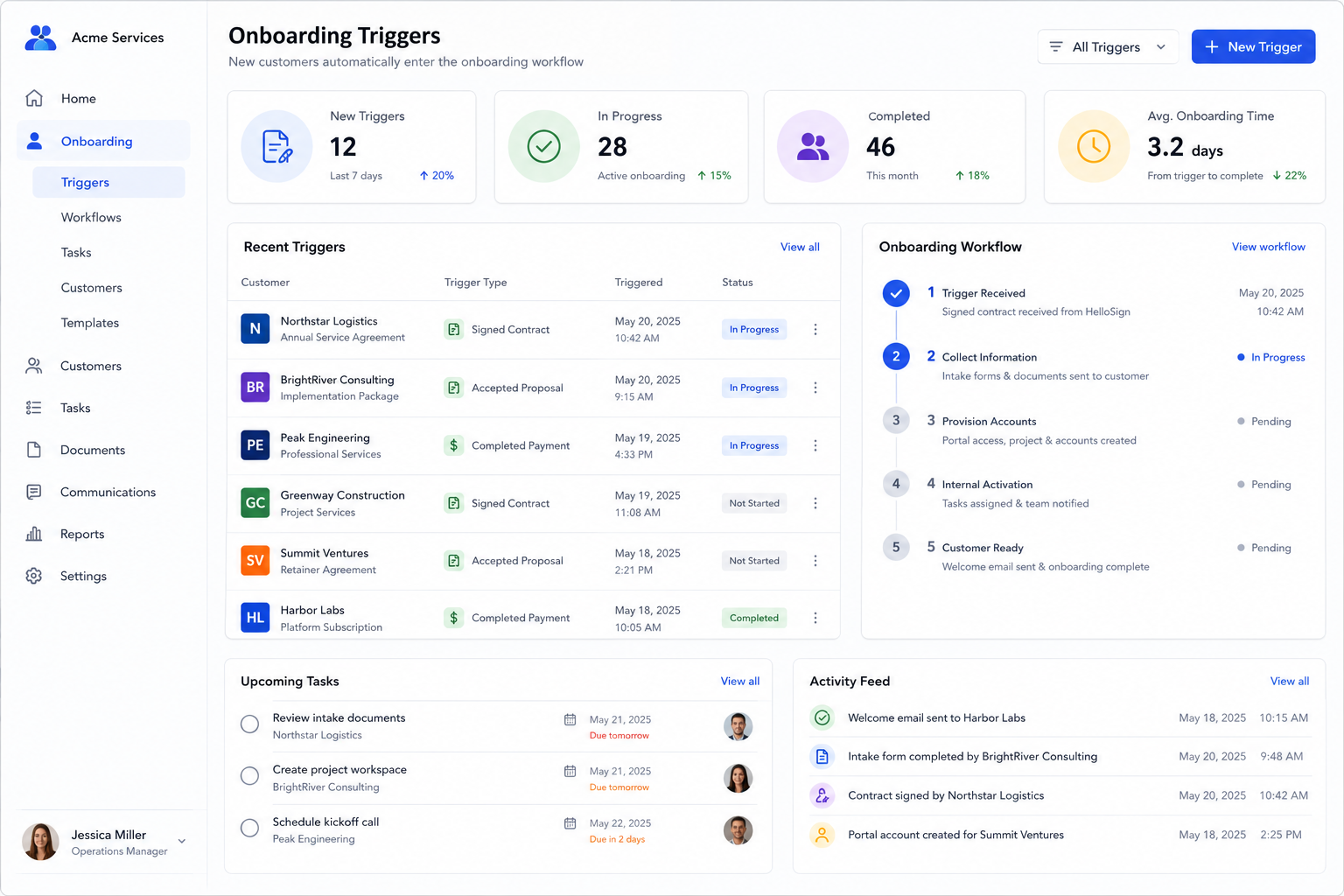
Onboarding Trigger Dashboard
Signed agreements and customer milestones automatically initiate onboarding workflows and task creation.
Automated Customer Setup
Forms, accounts, portal access, communications, and internal assignments are generated automatically.
Onboarding Progress Tracking
Teams can monitor onboarding completion, outstanding requirements, and customer readiness in real time.
Onboarding Solutions
Common Customer Onboarding Systems
New Client Intake
Automatically collect required information, documents, and approvals after a customer signs.
Service Business Onboarding
Create customer records, schedule kickoff activities, and launch implementation workflows automatically.
Customer Portal Provisioning
Generate portal accounts, permissions, and access credentials without manual setup.
Implementation Kickoff Automation
Assign internal teams, create project records, and initiate delivery processes automatically.
Compliance & Documentation Collection
Request required forms, signatures, certifications, and onboarding documents from customers.
Subscription & SaaS Onboarding
Provision accounts, deliver welcome materials, and activate services immediately after signup.
Impact
Typical Operational Improvements
Faster Customer Activation
Reduce delays between contract signing and project or service delivery.
Consistent Processes
Every customer receives the same onboarding experience regardless of who handles the account.
Less Administrative Work
Automate repetitive setup, communication, and account provisioning tasks.
Improved Visibility
Track onboarding progress, completion status, and outstanding requirements in real time.
Reduced Errors
Eliminate missed steps, duplicate data entry, and manual setup mistakes.
Better Customer Experience
Provide a professional, organized onboarding process from day one.
Compatibility
Connected To Your Existing Systems
Customer onboarding automation works best when connected directly to the tools already managing sales, customer records, projects, and communication.
Workflows can automatically move information between systems without duplicate entry or manual coordination.
This creates a seamless transition from signed customer to active account.
FAQ
Frequently Asked Questions
Q: What can trigger the onboarding workflow?
Q: Can onboarding forms be customized?
Q: Can portal accounts be created automatically?
Q: Can internal teams receive onboarding tasks?
Q: Can the system integrate with our CRM?
Still Manually Setting Up Every New Customer?
Every delay between contract signing and onboarding creates friction for customers and additional work for your team. Automation ensures every new customer starts quickly and consistently.